Running a clinic pharmacy involves more than simply maintaining medicine stock. Every expired medicine, unexpected stock-out, or excess purchase can impact patient care, increase operational costs, and reduce overall efficiency.
Effective medicine inventory management helps clinics ensure that essential medicines are available when needed while minimizing wastage and maintaining better control over inventory.
With the right inventory management system, clinics can monitor stock levels, receive timely alerts, and make informed purchasing decisions — all from a single platform.
Why Medicine Inventory Management Matters
Poor inventory management often leads to common challenges such as:
- Medicines expiring before they are used
- Frequently prescribed medicines running out of stock
- Excess inventory occupying valuable storage space
- Difficulty tracking inventory value and stock movement
These challenges not only affect day-to-day operations but can also increase unnecessary expenses.
The goal of inventory management isn't to keep more medicines in stock.
It's to maintain the right medicines, in the right quantities, at the right time.
Gain Complete Visibility into Your Pharmacy Inventory
Managing inventory becomes much easier when administrators have access to real-time information.
The FelixaTouch Medicine Inventory Dashboard provides a centralized view of your pharmacy inventory, helping you quickly identify areas that require attention. From a single dashboard, you can monitor:
Instead of manually checking individual medicine records, administrators can quickly understand the current inventory status and take action when required.
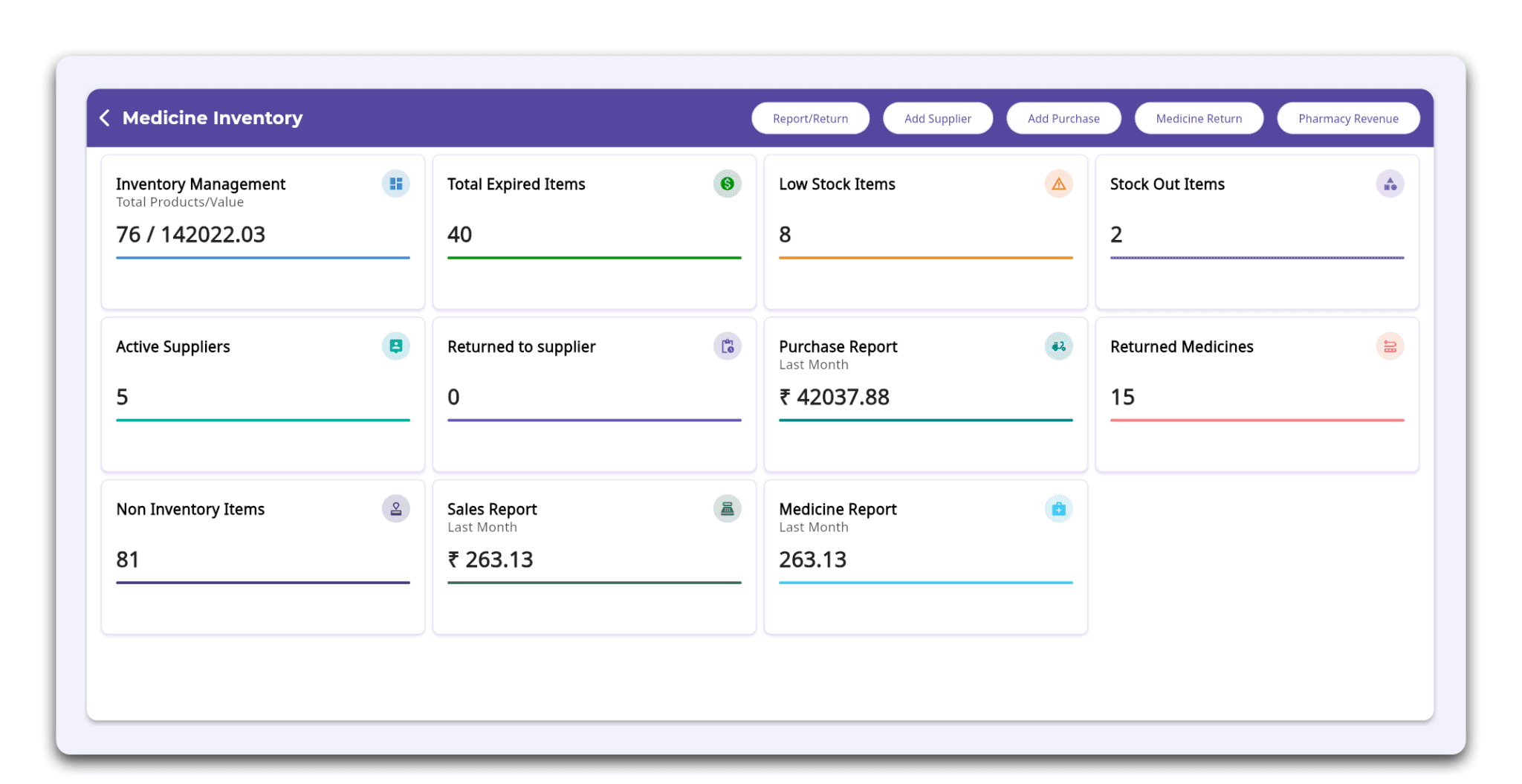
Screenshot 1: Medicine Inventory Dashboard
A centralized view of inventory status, helping clinics monitor stock levels, inventory value, suppliers, purchases, and returns.
Configure Inventory Settings to Match Your Clinic's Workflow
Every clinic has different inventory management requirements. FelixaTouch allows administrators to configure inventory settings that support consistent and efficient pharmacy operations. Key inventory settings include:
Low Stock Thresholds to receive alerts before medicines run out.
Expiry Alerts to identify medicines approaching their expiry date.
Stock Adjustment Approval to require administrator authorization before inventory adjustments are completed.
Summary Reports for regular inventory insights.
Medicine Return Period to define eligible return durations.
Inventory Issue Models such as FEFO (Expiry First Out), FIFO (First In, First Out), LIFO (Last In, First Out), and Manual Out to match your clinic's inventory workflow.
For medicines with expiry dates, the FEFO (Expiry First Out) method helps ensure medicines closest to expiry are issued first, reducing avoidable wastage and supporting better inventory practices.
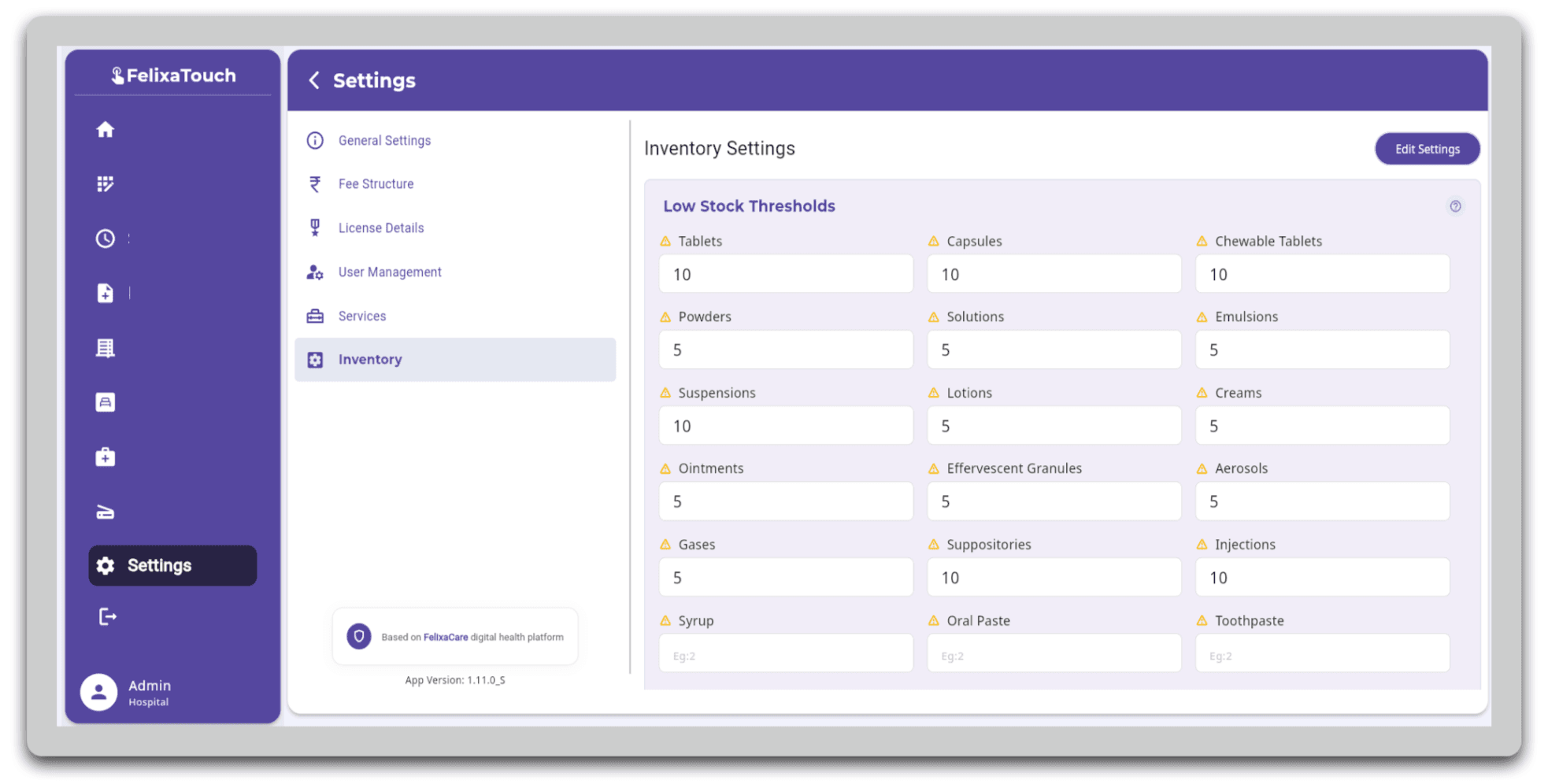
Screenshot 2: Inventory Settings
Configure inventory alerts, approval workflows, medicine return settings, and inventory issue models to match your clinic's operational requirements.
Better Inventory Control Means Better Decision-Making
Having accurate inventory information enables clinics to make smarter operational decisions. For example:
- Low-stock alerts help prevent medicine shortages.
- Expiry alerts reduce inventory loss caused by expired medicines.
- Inventory value provides better visibility into stock investment.
- Stock adjustment approvals improve inventory accountability.
- Summary reports support inventory planning and purchasing decisions.
Rather than reacting to inventory issues after they occur, clinics can identify potential problems early and take corrective action.
Simplify Pharmacy Inventory Management with FelixaTouch
FelixaTouch brings inventory monitoring and inventory controls together in a single, easy-to-use platform. With FelixaTouch, clinics can:
By combining real-time monitoring with configurable inventory settings, FelixaTouch helps clinics reduce stock loss, improve medicine availability, and manage inventory with greater confidence.
Why Choose FelixaTouch?
FelixaTouch combines pharmacy inventory, billing, prescriptions, patient records, and clinical workflows in one unified platform. Because stock movement is already connected to prescriptions and billing, inventory figures reflect what is actually happening in the clinic — without separate registers or manual reconciliation.
Conclusion
Efficient medicine inventory management is essential for every clinic. It helps reduce wastage, prevent stock-outs, improve purchasing decisions, and ensure that essential medicines are always available for patient care.
With FelixaTouch, clinics gain the tools they need to monitor inventory, configure smart inventory controls, and maintain better visibility across pharmacy operations — all from one integrated clinic management platform.
Less wastage, fewer shortages, and greater control over every medicine.
Ready to Simplify Your Clinic's Medicine Inventory?
Explore how FelixaTouch helps clinics manage pharmacy operations with greater visibility, accuracy, and control. Book a free demo today.