Patient registration is the first and most crucial step in any healthcare journey. From identifying patients correctly to maintaining accurate medical records, an efficient registration process directly impacts clinical operations, patient experience, and long-term care quality.
With increasing patient volumes and digital transformation in healthcare, clinics need a fast, flexible, and EMR-ready patient registration system. Felixatouch is designed to meet exactly these needs.
What Is Patient Registration?
Patient registration is the process of capturing patient details during their first interaction with a clinic or hospital. This information forms the foundation of the patient's Electronic Medical Record (EMR) and is used across consultations, diagnostics, billing, and follow-ups.
A well-structured patient registration system helps clinics:
- Avoid duplicate or incorrect records
- Reduce waiting time
- Improve care continuity
- Streamline administrative workflows
Patient Registration Workflows in Felixatouch
Felixatouch supports two practical patient registration workflows, allowing clinics to handle both detailed registrations and quick walk-in cases efficiently.
1. Complete Patient Registration
Used By: Admin / Front Desk / Doctor
Complete Patient Registration is used to create a permanent and comprehensive patient profile.
When to Use
- First-time patients
- Long-term treatment cases
- Patients requiring follow-ups and history tracking
Steps to Complete Patient Registration in Felixatouch
- 1
Log in to Felixatouch as Admin, Front Desk staff, or Doctor.
- 2
Open the Patient Registration module from the dashboard.
- 3
Select Complete Patient Registration.
- 4
Enter full patient details such as: Demographic information, Contact details, Identity and reference data
- 5
Save the record to generate a permanent EMR.
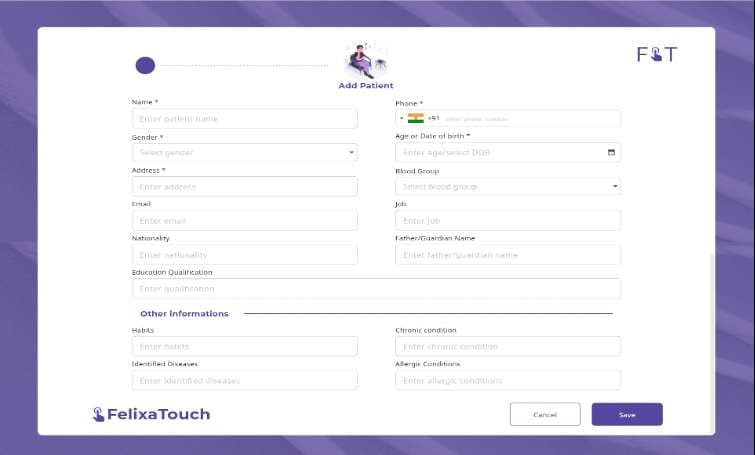
Figure 1: Complete Patient Registration Screen in Felixatouch
Comprehensive form with demographic information, contact details, and medical history fields
Outcome:
A detailed patient profile is created and securely stored with lifelong medical history for accurate consultations and continuity of care.
2. Spot (Quick) Patient Registration
Used By: Admin / Front Desk / Doctor
Spot Registration is designed for walk-in patients or situations where speed is critical.
When to Use
- Emergency or urgent visits
- High patient volume hours
- One-time consultations
Steps to Spot Patient Registration in Felixatouch
- Navigate to the Patient Registration module.
- Select Spot / Quick Registration.
- Enter minimal required details such as: Patient name, Contact number
- Save and proceed directly to consultation or billing.
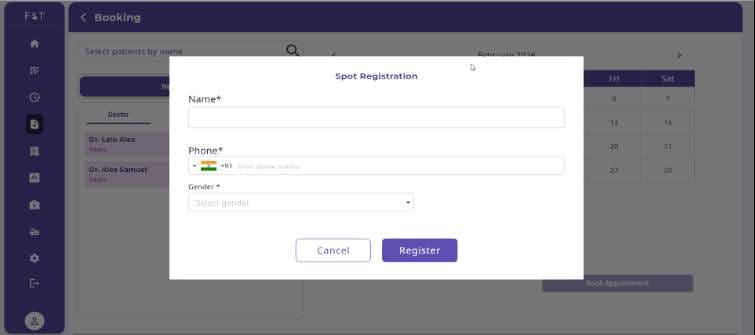
Figure 2: Spot Patient Registration Screen in Felixatouch
Minimal form with just name, phone, and gender for quick walk-in registrations
Outcome:
Patients are registered within seconds, significantly reducing waiting time and improving front-desk efficiency.
Why Clinics Choose Felixatouch for Patient Registration
Felixatouch simplifies patient registration while ensuring accuracy and speed:
Dual Registration Modes
For different clinical scenarios
Faster Patient Onboarding
Reduce waiting times significantly
Centralized EMR Management
Secure and lifelong medical records
Reduced Administrative Workload
Streamline front-desk operations
Seamless Integration
With appointments, billing, labs, and pharmacy
Conclusion
Patient registration is more than a formality—it is the backbone of efficient healthcare delivery. With Felixatouch, clinics can manage both comprehensive and quick patient registrations effortlessly while maintaining accurate and lifelong medical records.
Whether it's a regular patient or a walk-in visit, Felixatouch ensures patient registration is simple, fast, and future-ready.
Ready to Transform Your Patient Registration Process?
Experience the power of smart digital patient registration with Felixatouch. Book a free demo today and see how we can streamline your clinic operations.